I often see people reach for the mouse to select text or close a tab, even when they’re already typing. Most know how to copy and paste with the keyboard, but use the mouse for almost everything else.
I use the mouse plenty myself, but a few shortcuts have become habits. You don’t need to learn that many to find them useful. Things like moving between words or selecting a whole line come up often and are mostly universal across apps and operating systems.
I think most people just get used to doing things with the mouse. Learning shortcuts takes a bit of effort, and looking through a cheatsheet doesn’t help much if you don’t use what you’ve learned right away. I wanted to make something where you could practice them as you go.
That’s why I built Shortcut Express, a small desktop app that teaches shortcuts for everyday tasks. You practice them in a simulated text editor, browser, and other familiar parts of an app.
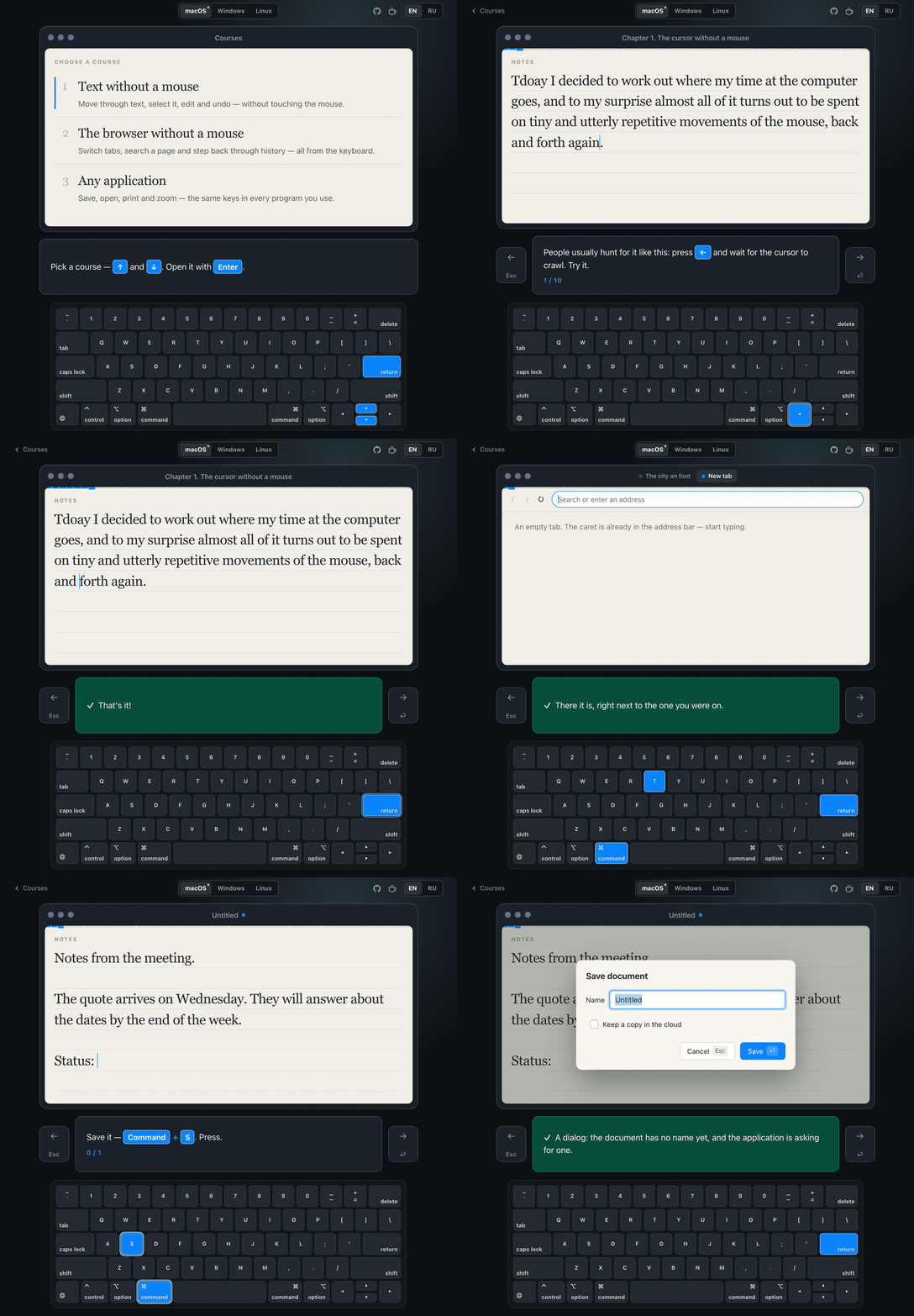
It is a course, not a cheatsheet or a quiz. Every lesson runs on something you actually operate — a document you edit, a browser with tabs and a find bar, an app that saves and prints. A keyboard at the bottom of the window lights up the keys you should press. Each chapter names a familiar problem, walks you through the faster way, then asks you to repeat it with the hints off.
The hard part was choosing what to leave out. Not the most shortcuts, but the smallest set that pays off every single day, in the order that makes each one stick. Three courses: text without a mouse, the browser, and the keys that mean the same thing in every application.
Building it with AI
I wrote almost none of it by hand — it was built with Claude Code — and the interesting part is where the work moved. AI handled everything mechanical: the drawn keyboard and its per-platform legends, the CSS, the release pipeline. That is the part that would have taken weeks of evenings.
What it could not do was decide what to teach, in what order, and how many repetitions a drill needs before it stops helping and starts annoying. That is where the app lives now: in the idea, in the mechanics, and in how far they get polished. The implementation turned into the secondary question.
Which means the quality of a program is set by how stubborn its author is, not by how well they write code. It was always that way — it is just much harder to pretend otherwise now. Nothing stops you from rebuilding a lesson for the fifth time except being unwilling to.
Secondary is not the same as unimportant. I still care how the code is written and organized, so besides reading the diffs myself, I tried Rejudge, a review tool that caught a fair number of real problems and inconsistencies. It was also my first serious look at the current open-source models — Kimi 3, DeepSeek v4, Qwen 3.8, GLM 5.3 — which I had not touched since Llama 3. They are far ahead of what their previous generations could do.
Try it yourself or show it to someone who needs it
Free and open source, for Windows, macOS and Linux, built with lightweight Tauri, React and TypeScript. No backend, no accounts, no telemetry: github.com/chimit/shortcut-express